Walk through setup
Lets take a look at the setup in my_first_plugin.
Look at the configured route
To view the route configured: bots-monitor->Configuration->Routes. This will look like:
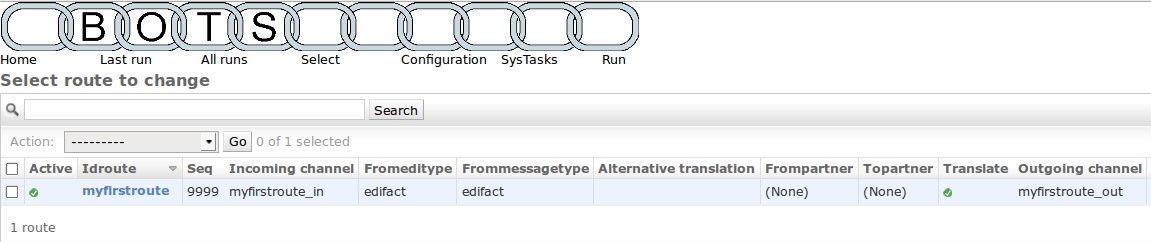
A route tells bots what to do: where to get the edi-files, what type of files these are (this determines the translation done), and where to put the translated edi-files..
One route is configured, called
myfirstfoute.The route uses communication channel
myfirstroute_into get incoming edi-files.These are edifact format: fromeditype=edifact, frommessagetype=edifact. Bots will figure out the exact messagetype (like ORDERSD96AUN) by itself.
The translated edi-files (fixed format) go to communication channel
myfirstroute_out.
View the communication channels
To view the communication channels configured: bots-monitor->Configuration->Channels. This will look like:
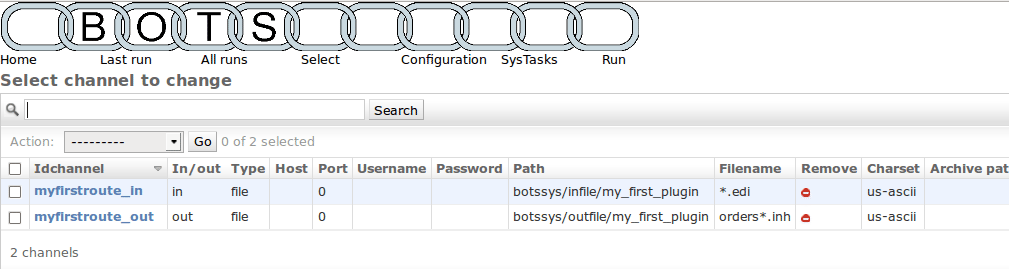
A communications channel communicates edi-files in or out of bots.
There are different types of channels, eg: file, ftp, smtp, pop3, etc.
In this plugin 2 routes are configured. Both are type
file: all reading and writing is to file system.There is one
in-channel and oneout-channel.Channels for file-system require a path and a filename.
The translations in this configuration
To view the translations configured: bots-monitor->Configuration->Translations. This will look like:
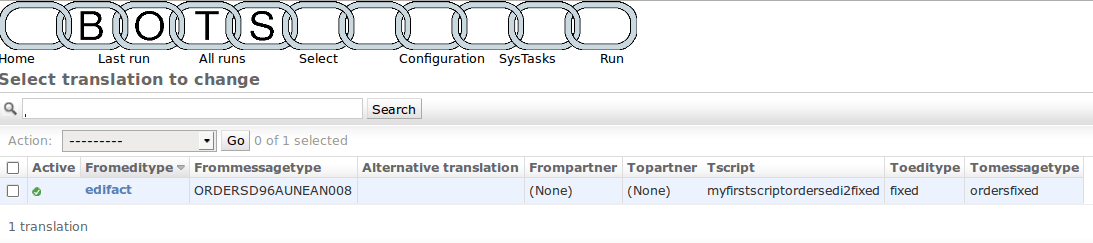
There is one translation configured.
This translation translates edi messages of editype
edifactand messagetypeORDERSD96AUNEAN008using mappingscriptmyfirstscriptordersedi2fixedto edi messages of editypefixedand messagetypeordersfixed.Each messagetype has a grammar which describes the message: records, fields, formats. The grammar is a file; you can find it in:
C:\Python27\Lib\site-packages\bots\usersys\grammars\fixedThe mapping script does the actual translation; basically it gets data from the incoming message and puts the data in the outgoing message.
The mapping script is a file; you can find it in:
C:\Python27\Lib\site-packages\bots\usersys\mappings\edifact